
- December 12, 2025
2 months ago
0 Comments
How to Setup Facebook Conversion API Full Guide 2026
Meta Pixel is one of the most important tools for online business or sell service. It allows you to understand visitor behavior for optimize ad performance, and scale campaigns with accurate data. Without Meta Pixel, Facebook and Instagram ads become worthless—leading to wasted budget, poor targeting, and lost sales.
Now let’s talk about a painful problem. If you’re seeing messages like “We restricted your business”, “You can’t use Meta Pixel”, or “Your business is prohibited from advertising”, on Facebook Business Manager, You are in the right place. I would like to say you’re not alone who face this problem. Thousands of advertisers face this issue every year, and it can instantly stop ads, tracking, and conversions.
This article will explains why Facebook Business Manager account gets restricted, how it affects Meta Pixel and your business, and step-by-step instructions to recover your account, important tips to avoid future restrictions.
What Does “Facebook Business Account Restricted” Mean?
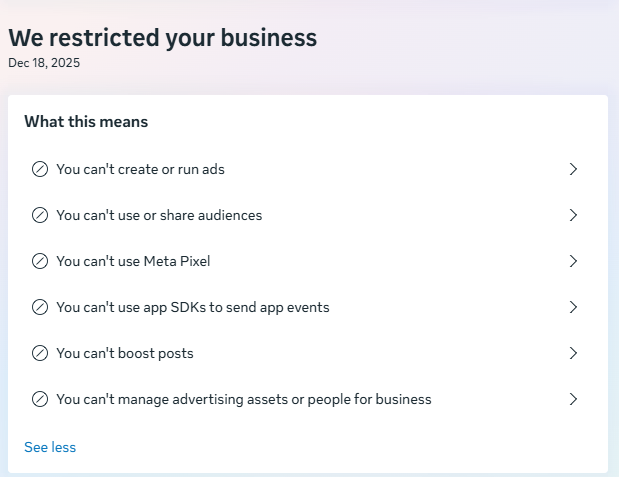
When Meta restricts a business account (Business Manager / Business Portfolio), it means the account has lost advertising benefit. As shown above, Meta clearly states that the business cannot be used to advertise.
Once restricted, the following limitations apply:
- You can’t create or run ads
- You can’t boost posts
-
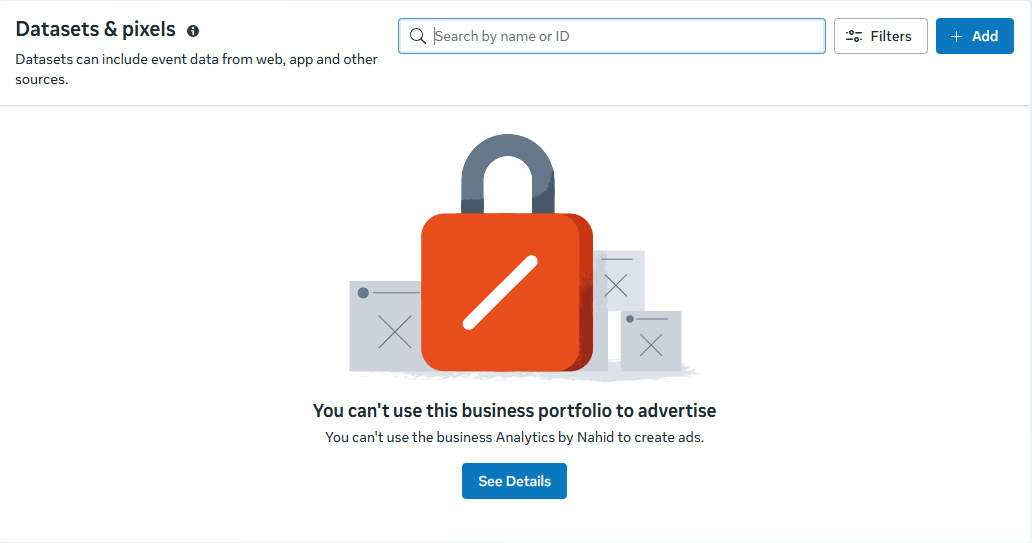
You can’t use or create Meta Pixel
- You can’t share or use audiences
- You can’t manage advertising assets or people
In short: your entire advertising system is frozen.
“Facebook business account restricted? Learn how to recover Meta Pixel access, fix ad restrictions, request review, and prevent future blocks”
— Nahid Khan
Why Meta Pixel Stops Working When Your Business Is Restricted
Meta Pixel is classified as a core advertising asset. When a Facebook business Manager account is restricted:
-
New pixels cannot be created
-
Existing pixels stop receiving events
-
Conversion tracking becomes inaccurate
-
Server-side tracking (Conversion API) also stops
This is why many users suddenly see messages like:
| You can’t use Meta Pixel
Even if your website and code are correct, tracking will not work until the restriction is lifted.
Common Reasons Facebook Restricts Business Manager
Meta uses automated systems to protect users and advertisers. Restrictions are often triggered by signals rather than intentional wrongdoing.
Most Common Causes
- Policy Violations
- Rejected ads repeatedly
- Misleading claims or landing pages
- Non-compliant content
2. Suspicious Activity
-
Creating pixels immediately after business setup
-
Rapid creation of assets (ads, datasets, domains)
-
Logging in from VPNs or multiple countries
3. Payment & Billing Issues
-
Failed payments
-
Mismatch between business name and card details
4. Unverified Business Information
-
No business verification
-
No domain verification
-
Missing legal pages on the website
5. Low Trust Signals
-
New Facebook profile managing the business
-
No previous ad history
-
Poor Page or account quality
How to Recover a Facebook Business Account (Step-by-Step)
Step 1: Check Account Quality
Go to Business Settings → Account Quality and click See Details. This section shows the reason for restriction and whether a review is available.
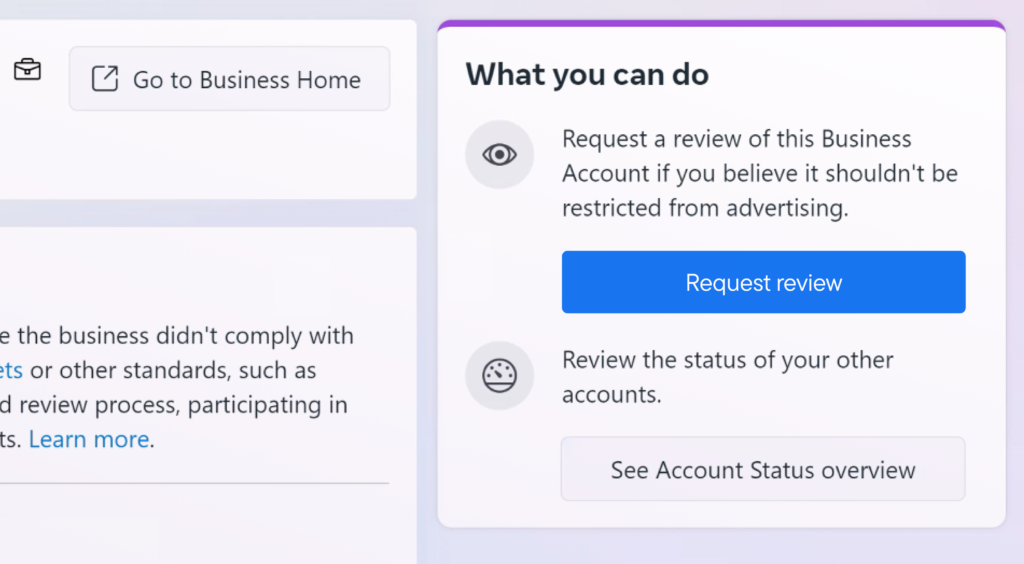
Step 2: Request a Review (Correct Way)
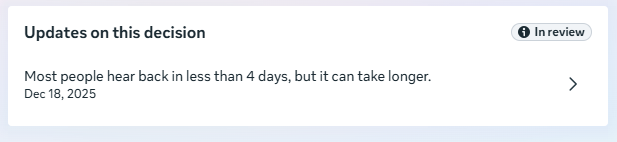
If your status shows “In Review”, Meta is already checking your account. If not, submit a review carefully.
Best practices for review submission:
-
Be polite and professional
-
Do not argue aggressively
-
Clearly explain your business model
-
Avoid admitting violations you didn’t commit
Sample Review Message:
Hello Meta Team,
I believe my business manager account was restricted by mistake. I run a legitimate analytics and tracking service and always aim to follow Meta advertising policies. I kindly request a review of my business manager account. I’m happy to provide any additional information if required.
Thank you.
Your Id Name
Step 3: Complete Business Verification Immediately
Even if Meta doesn’t request it, complete verification:
-
Verify business email
-
Upload legal documents (if prompted)
-
Add real business address and phone number
-
Verify your domain
-
Enable two-factor authentication for all admins
Many Facebook business account restrictions are lifted after proper verification.
Step 4: Clean Up Your Business Manager
Before the review finishes:
-
Remove unused or suspicious admins
-
Remove inactive ad accounts
-
Stop using VPNs or proxy connections
-
Log in from one consistent device/location
-
Ensure your website has:
-
Privacy Policy
-
Terms of Service
-
Refund Policy
-
Contact page
Meta silently checks these trust signals.
How Long Does Meta Review Take?
-
Typically 1–4 business days
-
Sometimes up to 7–14 days
-
Complex cases may take longer
Once approved, Meta Pixel access is automatically restored.
What If the Restriction Is Not Removed?
If your Facebook business account remains restricted:
Option 1: Create a New Business (Safely)
-
Use a new Business Manager
-
Verify domain before creating pixels
-
Add an aged, trusted Facebook profile
-
Warm up slowly
Option 2: Use Client Business Manager Access
If you’re a service provider, request partner access instead of owning assets.
Option 3: Prepare Server-Side Tracking
You can configure Conversion API in advance, but events won’t fire until restrictions are lifted.
Tips to Avoid Facebook Business Account Restrictions
-
Verify business early
-
Warm up ad accounts slowly
-
Avoid rapid asset creation
-
Use real, consistent business information
-
Keep ad rejection rates low
-
Maintain clean admin access
Final Thoughts
A Facebook business manager account restricted status can feel overwhelming—especially when it disables Meta Pixel and tracking. The good news is that most restrictions are temporary and recoverable when handled correctly.
Follow the steps in this guide, maintain compliance, and focus on building long-term trust with Meta. Proper setup today prevents major problems tomorrow.
Final Thoughts
If your Facebook business manager account is restricted and you’ve lost Meta Pixel or conversion tracking, don’t risk trial and error.
I help businesses recover restricted accounts, or open new Facebook business manager account, Meta Pixel & Conversion API, and set up clean, compliant tracking.
👉 Get your tracking fixed and ads running again — message me now for a review of your account.
Categories
Latest Blogs
- All Posts
- Blog
- Facebook Business Manager
- Facebook Conversion API
- Google Analytics 4
- Google Tag Manager
- Meta PIxel
 December 18, 2025
Meta Pixel and Facebook CAPI: 5 Essential Reasons for 2026
 December 18, 2025
Business Account Restricted: How to Recover Meta Pixel 2026
December 12, 2025